AppAudit Pro: User Guide
Version 1.2 · Community Edition Mobile app security, QA and Play Store readiness audits, on your own computer.
1. What AppAudit Pro does
AppAudit Pro checks a mobile app before you release it. You give it an app file, and it returns a scored report that shows:
- security problems, ranked from Critical to Low, each with a plain-language fix;
- quality and stability problems found while the app runs on a real phone or emulator (crashes, freezes, memory growth, leaked data in logs);
- Google Play readiness indicators (target Android version, signing, 64-bit support and similar checks);
- a professional PDF report you can hand to a client, manager or auditor.
Everything is analysed on your computer. Your app files are not uploaded anywhere.
2. Before you start
Files you can audit
| File type | What it is | Checks available |
|---|---|---|
.apk | Android app package | Full analysis, including testing on a phone or emulator |
.aab | Android App Bundle (Play Store upload format) | Full analysis; converted automatically for device testing |
.ipa | iOS app package | Analysis of the package contents (device testing is Android only) |
You can also point the app at a project folder (source code) for an additional code review.
Computer requirements
| Minimum | Recommended | |
|---|---|---|
| Operating system | Windows 10 or 11 (64-bit), or Linux (x64) | Same |
| Memory | 4 GB | 8 GB (for device testing) |
| Free disk space | 500 MB | 1 GB (room for saved reports and logs) |
| Android phone or emulator | Only for runtime testing | A phone with USB debugging, or an Android emulator |
Some features rely on small helper components that are installed together with the application or checked on first use. Settings → System Diagnostics tells you whether everything is ready and how to fix anything that is missing. If something cannot be fixed from there, contact support (section 17).
3. Installing and opening the app
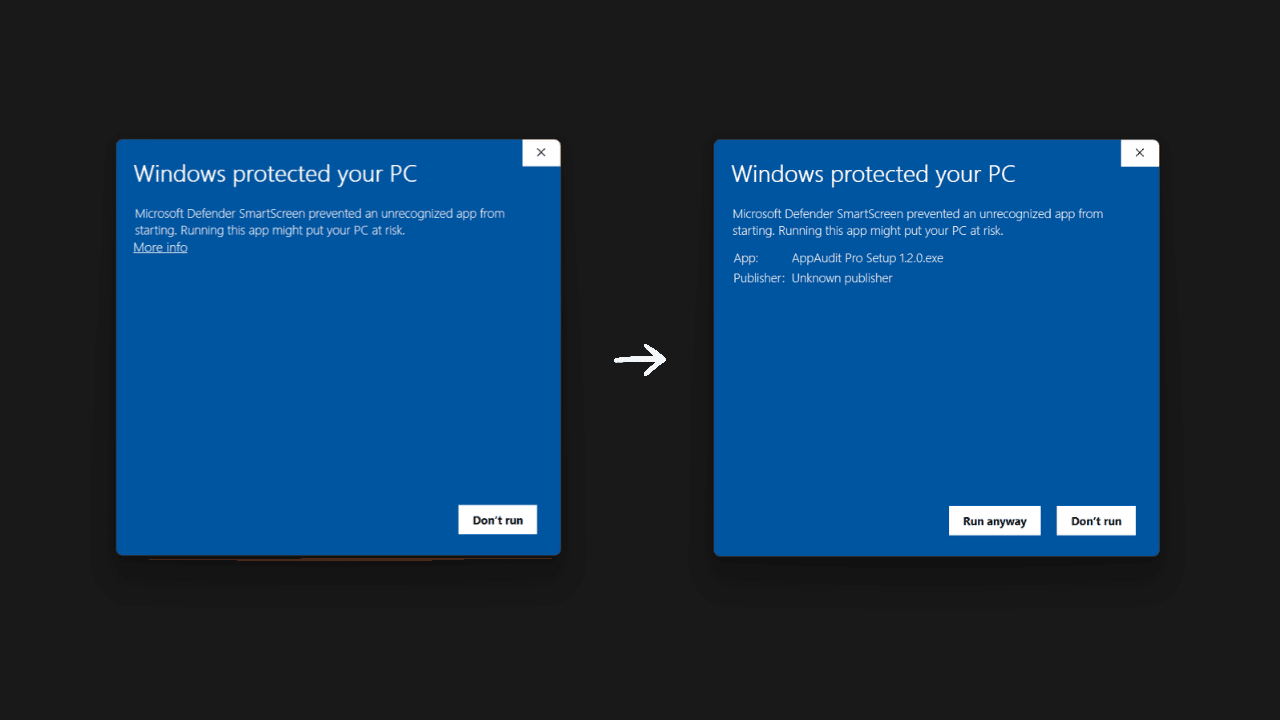
- Run the installer you received and follow the steps.
- Open AppAudit Pro from the Start menu (or your application launcher on Linux).
- The first screen is the Dashboard. No account, sign-in or license key is needed.
4. Quick start: your first audit in five steps
- Open the Dashboard.
- Drop your app file (
.apk,.aabor.ipa) into the drop area, or click it to browse. - Choose how deep to go (section 6). For a quick check, select Static analysis only. For a full audit with a phone or emulator connected, keep Full Map Crawl (recommended).
- Start the audit and watch the live progress.
- When it finishes, review the summary and click Export PDF report.
5. Finding your way around
The menu on the left has four areas:
| Area | Use it to |
|---|---|
| Dashboard | Pick the app, choose test options, start an audit, see the results |
| Live audit | Watch a running audit: logs, screens discovered, memory and CPU, and interact when the test needs you |
| History | Reopen, compare and delete previous reports |
| Settings | AI options, appearance, scan limits, export folder, device tools, diagnostics |
At the bottom of the menu, About shows the product version, contact details and legal information.
6. Choosing what to test
Google Play option
Tick Targeting Google Play Store Release? when you plan to publish on Google Play. This turns on stricter checks (signing quality, 64-bit support, data-safety indicators, target Android version). These are indicators to help you prepare; they do not guarantee approval.
Project folder (optional)
Use Choose folder to select your source-code folder. AppAudit Pro then reviews your code for common problems and shows the file and line, with a suggested fix. It skips generated folders, dependencies and build output so results stay relevant.
Runtime testing modes
Runtime testing installs the app on a connected Android phone or emulator and watches how it behaves.
| Mode | What happens | Best for |
|---|---|---|
| Full Map Crawl (recommended) | The app opens and waits while you finish sign-up, PIN or login. When you press Start Full Map Crawl, it explores every screen and control and checks each one. | Complete audits |
| Scenario Flow | Replays a test you build yourself, such as PIN setup or login, with security logging running throughout. | Repeatable tests |
| Strict Manual Testing | You use the app yourself. Nothing is tapped automatically. AppAudit Pro only watches logs, network use and memory until you finish or the timer ends. | Sensitive flows you want to control |
| Automated Stress Test (Monkey) | Random taps and gestures (500, 1500, 3000 or a number you choose) to look for crashes and freezes. | Quick stability check |
| Static analysis only | No device testing. | When no phone or emulator is available |
No automated input is ever sent before you press the start button in the Full Map Crawl and manual modes.
Optional extras
- Auto-unlock credentials: enter a test PIN or password so the audit can pass a lock screen. They are kept in memory only for the current audit and are not saved.
- Intent testing: an opt-in check that sends unusual requests to the app's publicly reachable screens to see whether any crash or expose data.
- In-app purchase guard (Settings): the audit skips buttons that look like purchases (buy, subscribe, upgrade, checkout and so on) so no real payment is triggered. Smart matching is recommended; Strict skips more buttons but reaches fewer screens.
7. Connecting an Android phone or emulator
Phone
- On the phone, open Settings → About phone and tap Build number seven times to enable Developer options.
- Open Developer options and switch on USB debugging.
- Connect the phone by USB and accept the "Allow USB debugging?" prompt on the phone.
- In AppAudit Pro, use the device refresh button on the Dashboard. Your device should appear in the list.
Emulator
Start an Android emulator on your computer, then refresh the device list.
If the audit shows No phone or emulator detected, the report marks runtime testing as not tested; static results are still complete.
Tip: use a test device or emulator, not a phone with personal data. Keep the screen on and unlocked while the audit runs.
8. Understanding your results
The summary card
- Security score (0 to 100): higher is better. It summarises the findings; it is a guide, not a certificate.
- Severity counts: how many findings are Critical, High, Medium or Low.
- Audit method: Rule-based Heuristic Audit (No AI) or AI-Assisted Audit (section 10).
Findings
Each finding explains what was found, why it matters, where it was found and how to fix it. Findings are grouped by area, such as data storage, network, authentication, platform use, code quality and resilience.
| Severity | Meaning | Suggested action |
|---|---|---|
| Critical | Serious weakness, likely to be exploited | Fix before release |
| High | Significant risk | Fix before release |
| Medium | Worth fixing soon | Plan a fix |
| Low | Minor or informational | Review when convenient |
Other result sections
- Application stack: the technology the audited app was built with.
- Google Play readiness: checks against Play requirements when the Play option is ticked.
- Runtime results: crashes, freezes, memory and CPU graphs, sensitive data seen in logs, insecure connections, and the screens that were visited.
- Not tested: if a part of the audit could not run (for example, no device was connected), the report says so clearly instead of implying it passed.
Important: how to read results
Automated analysis cannot prove an app is free of vulnerabilities. Some findings are indicators that a person should confirm. Use the report as a strong starting point for review, not as a final verdict.
9. Exporting reports
Open the finished audit and use the buttons under the summary card.
Export PDF report
A short form appears. All fields are optional:
| Field | Purpose |
|---|---|
| Client / target organization | Printed on the cover |
| Lead security auditor | Printed on the cover and sign-off page |
| Watermark | CONFIDENTIAL, AUDIT DRAFT or your own text |
| Open password | Basic protection so only people with the password can open the file. Share it separately. It cannot be recovered if lost. |
| Layout | Community (brand banner on every page) or Executive (clean pages, branding on cover and sign-off) |
The PDF has a cover with the score and risk level, an executive summary, detailed findings with fixes, coverage notes and a sign-off page with a signature line. A QR code on the cover and sign-off page opens the AppAudit Pro product page.
Export SARIF
A standard file format that GitHub Code Scanning, GitLab and other code-review tools can read, so findings appear next to your code.
Export JSON
The full result as structured data, for your own scripts or records.
Where files are saved
The save window opens in your default export folder. Change it in Settings → Reports and exports, then click Save settings. If no folder is set, your Documents folder is used.
10. Optional AI explanations
AppAudit Pro works fully without AI. With no key set, you get the Rule-based Heuristic Audit, which uses built-in guidance for fixes.
If you want more tailored explanations and suggested code changes:
- Open Settings → AI provider and model.
- Choose Gemini or OpenAI, pick a model, and paste your own API key.
- Use the test button to check the key, then click Save settings.
Please note:
- Your key, your account. Usage is billed by the provider you choose. Large projects can use a lot of quota. LKPixel does not control or pay for that usage.
- Data leaves your computer only when you use AI. Finding details are sent to the provider you selected. Secret values are masked before sending, but you remain responsible for what you scan. Remove confidential files, credentials and environment files from a project folder before using AI.
- Your key is stored encrypted on your computer and can be removed at any time in Settings.
11. Settings reference
| Section | Options |
|---|---|
| Appearance | System, Light or Dark theme |
| AI provider and model | Provider, model, API key, key test (optional) |
| Scan limits | How many files are analysed in parallel (lower it to keep your computer responsive) and how many screens deep the Full Map Crawl follows (1 to 100, default 25) |
| Reports and exports | Default export folder |
| Android App Bundle support | Optional path to the bundle converter; normally leave empty |
| In-app purchase guard | Smart or Strict matching of purchase buttons |
| Maintenance | Clear cache removes temporary files. It never deletes your history or settings. |
| System Diagnostics | Checks that everything needed is ready; Repair Environment fixes common device-connection problems |
Remember to click Save settings after changing options.
12. History and comparing audits
Every finished audit is saved automatically.
- Open a past report to review it or export it again.
- Compare two audits of the same app to see what was fixed and what is new.
- Delete an audit to remove it from this computer permanently. PDF and JSON files you already exported are not affected.
- If a runtime audit was interrupted, Resume Previous Session appears on the Dashboard and continues from the screens not yet visited.
13. Privacy and your data
- Analysis runs locally. Your app files, source code and reports stay on your computer.
- AppAudit Pro does not send usage statistics.
- The only time information leaves your computer is when you turn on AI features (section 10) or click a link that opens in your web browser.
- Reports and history are stored on your computer. Delete them from History, and use Clear cache to remove temporary files.
14. Troubleshooting
| Problem | What to try |
|---|---|
| "No phone or emulator detected" | Check the USB cable, enable USB debugging, accept the prompt on the phone, then refresh the device list. Use Settings → System Diagnostics → Repair Environment. |
| Phone shows as "unauthorized" or "offline" | Unplug and reconnect, revoke USB debugging authorizations in Developer options, reconnect and accept the prompt. |
An .aab file cannot be tested on the device | Open Settings → System Diagnostics and check the bundle converter item. Reinstall the application if it reports a missing component. |
| A required component is missing | Open Settings → System Diagnostics. It lists what is missing and what to do. If you need help, contact support. |
| The audit is slow or the computer feels sluggish | Lower the parallel analysis setting in Scan limits, close other heavy programs, and keep large project folders on a local drive. |
| A runtime audit stops half way | Keep the phone unlocked and the screen on. Use Resume Previous Session on the Dashboard. |
| PDF is saved somewhere unexpected | Set your Default export folder in Settings and click Save settings. |
| Forgotten PDF password | It cannot be recovered. Export the report again from History. |
| The screen looks too dark or too light | Change Appearance in Settings. |
15. Responsible use
- Audit only apps you own or have written permission to test.
- Use test accounts and test data. Do not run runtime tests on production accounts.
- Findings are guidance. Confirm important results with a qualified person before making release or compliance decisions.
- Results for Google Play and similar stores are readiness indicators and do not guarantee acceptance.
16. Frequently asked questions
Is AppAudit Pro free? The Community Edition is free to use, with no license key and no scan limits. It remains proprietary software owned by LKPixel; copying, reselling or redistributing it is not permitted (see the license shown in About → Legal & licenses).
Does it need an internet connection? No, for the audit itself. Internet is only needed if you choose to use AI features or open a web link.
Can I audit iPhone apps?
You can analyse .ipa packages. Testing on a running device is available for Android only.
Can I add my name and my client's details to the report? Yes. When you export a PDF, you can add the target organization (client name), the lead auditor name, and a custom watermark. These appear on the cover and sign-off pages.
Can I audit several apps in a row? Yes. Finish or cancel the current audit, then drop in the next file. Each one is saved in History.
Will the audit buy things or send messages from the app? The purchase guard skips buttons that look like payments. Always use a test account and test device to be safe.
How do I report a problem or suggest a feature? Use the contact details below.
17. Getting help
| Website | https://lkpixel.com |
| Product page | https://lkpixel.com/software/appaudit-pro |
| Documentation | https://lkpixel.com/software/appaudit-pro/docs |
| Help centre | https://lkpixel.com/contact |
| [email protected] |
When you contact support, please include: your operating system, the AppAudit Pro version (shown in About), the type of file you audited (.apk, .aab or .ipa) and what you saw on screen.
© LKPixel. All rights reserved. AppAudit Pro is provided "as is". Audit results are indicators and must be confirmed by a qualified person.